
Device Map
NOTE
The Device Map provides spatial awareness of your entire IoT deployment. Geolocation is critical for logistics, smart agriculture, and tracking applications.
Geographic Overview
This view plots all your active devices on an interactive map.
Key Features
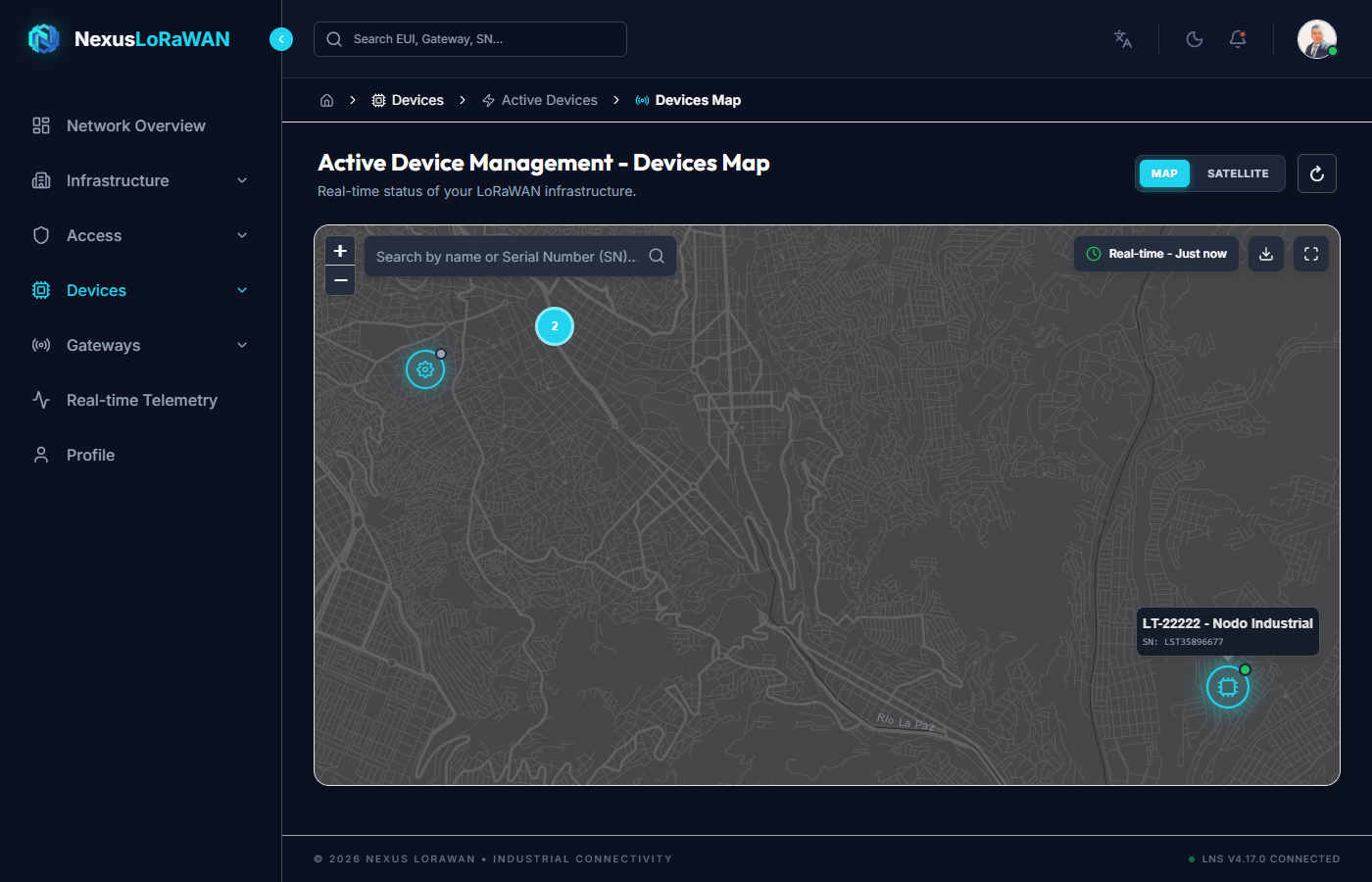
- Clustering: When zooming out, devices in close proximity are grouped into clusters with a number indicating how many sensors are in that area, keeping the map clean and readable.
- Status Indicators:
- 🟢 Green Marker: The device is active and has transmitted recently.
- 🔴 Red Marker: The device is offline or has missed several expected transmission windows.
- ⚪ Gray Marker: The device is registered but has never joined the network.
- Filtering: Use the top bar to filter devices by Subsidiary, Status, or Device Profile.
Interacting with Devices
You can interact directly with the markers on the map to get quick insights without leaving the geographic view.
Hover Information
Hovering your mouse over a marker displays a quick tooltip with the device's name and its last seen status.
Detailed Popup
Clicking on a marker opens a detailed popup containing:
- The device's DevEUI and exact coordinates.
- A mini-chart of its most recent critical telemetry (if configured).
- A direct shortcut button to navigate to the Device Monitor for deep analysis.