
Device Profiles
NOTE
Device Profiles define the exact technical and radio-frequency capabilities of the LoRaWAN sensors. LumiotLoRaWAN connects directly via gRPC with LoRaWAN Network Server to synchronize these parameters. You must create a Profile before you can activate any device.
Profile Inventory
This module lists all available configuration templates. A profile can be reused by thousands of identical sensors (e.g., creating a single profile called "Milesight AM103" and assigning it to 500 temperature sensors).
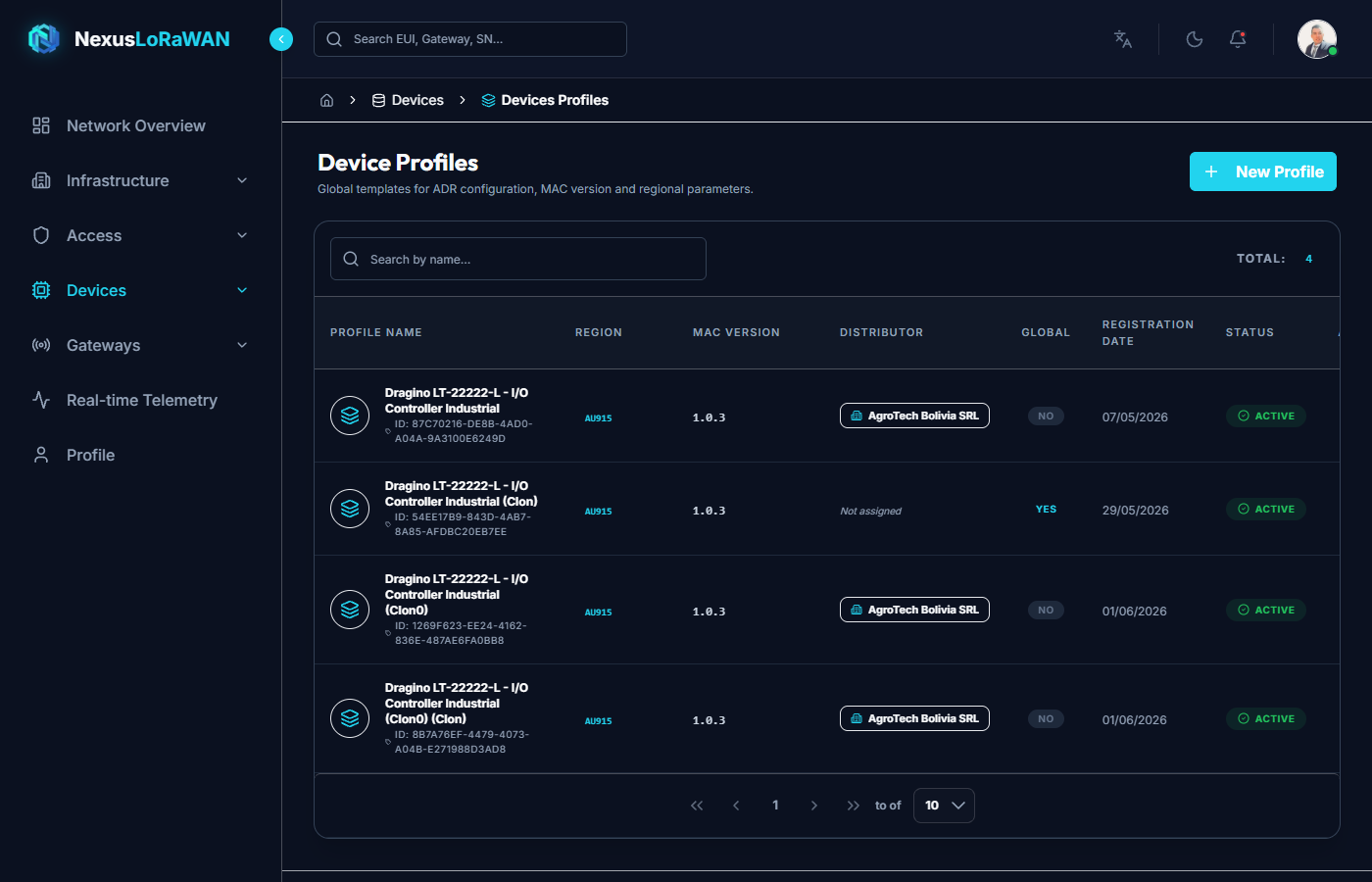
The table displays:
- The internal LoRaWAN Network Server ID.
- The profile's Name.
- The Region of operation (e.g.,
US915orEU868). - The MAC Version (LoRaWAN specification standard).
- Actions: Edit, Clone, or Delete.
Creating a New Profile
Clicking + New Profile opens an advanced configuration wizard. Due to the high technical complexity of LoRaWAN parameters, the interface is strictly divided into specialized tabs.
1. General Tab
- Name *: Clear identifier (Recommended: Manufacturer + Model, e.g., Dragino LHT65N).
- Region *: Frequency band. In LATAM,
US915orAU915is generally used. - MAC Version *: LoRaWAN version supported by the device (usually
1.0.3or1.0.4). - Regional Parameters Revision *: PHY specification revision.
2. Join Tab (Activation Method)
- Supports OTAA: Check this if the device joins the network dynamically requesting session keys (Recommended). If unchecked, the system assumes
ABP(Activation by Personalization).
3. Class B / Class C Tabs
By default, all LoRaWAN devices operate in Class A (maximum battery savings, they only listen after speaking).
- Supports Class B: For devices that wake up at synchronized periodic times (ping slots).
- Supports Class C: For actuators connected to the electrical grid that must listen to commands 24/7 without interruption (e.g., smart relays or streetlights).
4. Codec Tab
The Codec is a JavaScript function that runs securely on the server. Its mission is to capture the hexadecimal payload sent by the sensor and transform it into a readable JSON format (e.g., converting 010a to {"temperature": 25.5}).
You can paste the decoder provided by the manufacturer in this section so that LumiotLoRaWAN automatically decodes all traffic.
Cloning Profiles
If you need to create a profile similar to an existing one but with minor variations (e.g., same sensor but different frequency region), use the Clone action.
This drastically saves time by duplicating all configuration variables and the Codec function. Just give it a new name and click "Clone".
Editing Profiles
You can adjust parameters at any time. Important: Any change made to a Profile (such as updating the JavaScript Codec) will immediately apply retroactively to all active devices that use this profile, instantly changing how their future telemetry is processed.