
Distributor Management
NOTE
In the internal architecture, Distributors (Tenants) represent the highest layer of isolation. Each distributor has its own environment, users, and network quotas. A distributor is equivalent to an entity or company that contracts the LumiotLoRaWAN SaaS platform service to subsequently create applications or subsidiaries for their end clients.
Main Inventory
The Distributors module allows you to view, create, and edit the platform's main clients. The main list clearly displays all registered distributors and their corporate metrics.
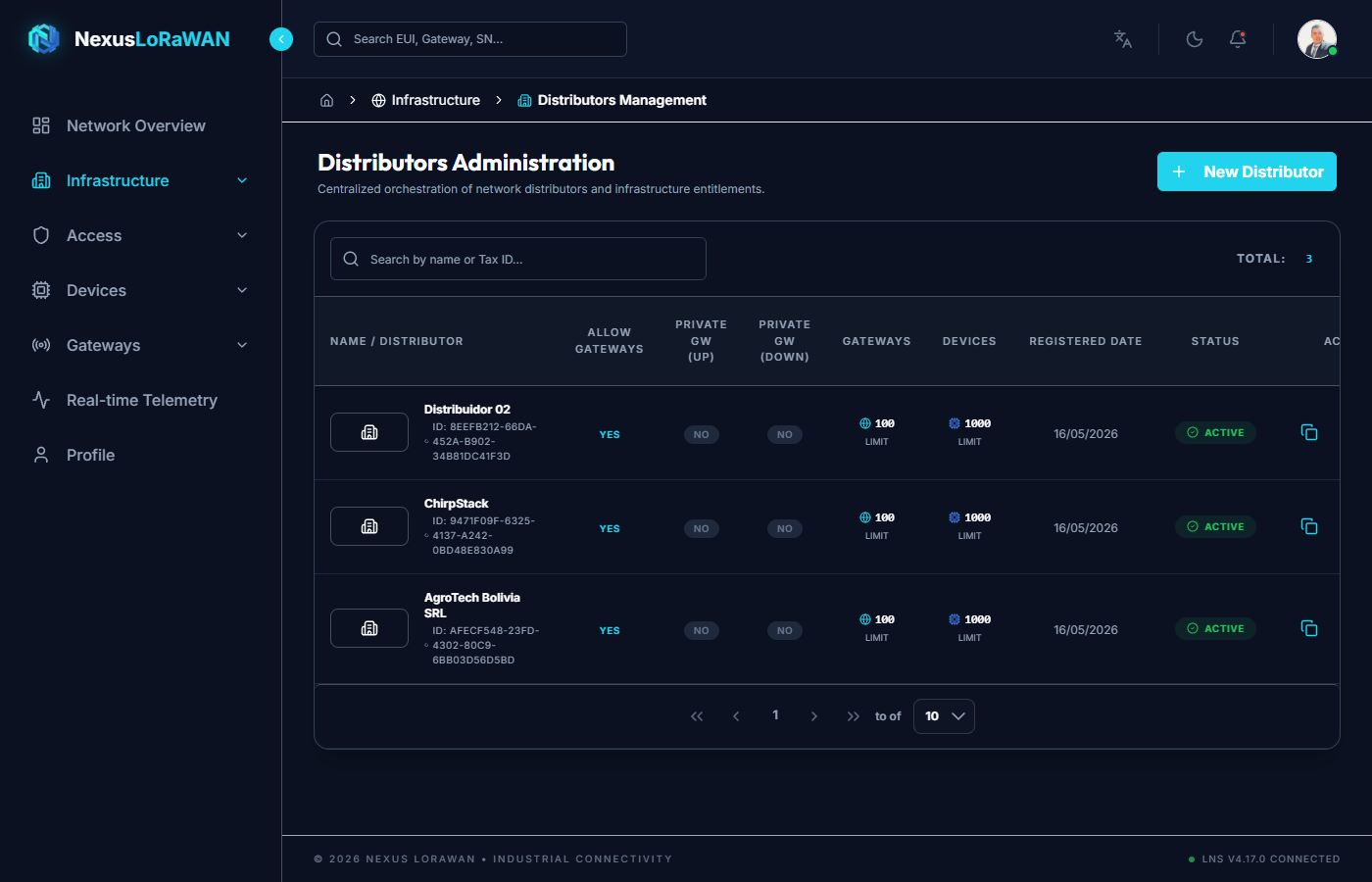
Interface Elements
- Top Bar: Contains the
+ New Distributorbutton and the global search bar by name, Tax ID, or description. - Identity (Column 1): Displays the distributor's official logo and commercial name. Below it, the
LoRaWAN Network Server IDis included for network traceability. - Network Privileges:
Can Have Gateways: Indicates whether the distributor can register their own base stations.Private Uplink: Whether sensor traffic is private or routed by default.Private Downlink: Command sending permissions at the infrastructure level.
- Limits/Quotas:
Base Stations: Maximum number of gateways that can be registered.Devices: Maximum number of sensors that can be registered across the entire account.
- Status: A dynamic green (
Active) or red (Suspended) label. Attention: Suspending a distributor immediately blocks all its users in cascade (Global Kill-Switch). - Actions Column:
- 📋 Copy Button: Copies the distributor's internal UUID to the clipboard.
- ✏️ Edit Button: Opens the modal to modify information or permissions.
- 🗑️ Delete Button: Deletes the distributor.
New Distributor Registration
Clicking + New Distributor displays an interactive modal window divided into two logical tabs: General and Tags.
General Tab
This tab groups corporate contact details and licenses:
Corporate Details:
Logo: Upload the client's emblem (ideally.pngor.svg). The system resizes and previews the image.Corporate Name: Required.Tax ID (NIT/RUT): Corporate tax identification document.Email / Phone / Address / Description: Optional information for billing and support.
Quotas and Licensing:
Active: Enables or suspends the entire account instantly.Can Register Gateways: Decides whether the tenant will own network infrastructure, or only be a client of your main network.Private Uplink/Downlink: Strict LoRaWAN traffic privacy for the Tenant.Gateway / Device Limit: Exact numeric quota forms-billingbilling control.
Tags Tab
Tags are essential for routing and additional metadata on the network server.
- Allows adding custom metadata in
Key : Valueformat (e.g.,Region: LATAM,Plan: Premium). - These tags are synchronized directly with the Profile in LoRaWAN Network Server.
Distributor Editing
Clicking the Pencil icon ✏️ opens the edit modal, which maintains exactly the same structure as the creation modal, allowing you to update any configuration in real-time, increase network quotas if a client requests it, or suspend them for non-payment.